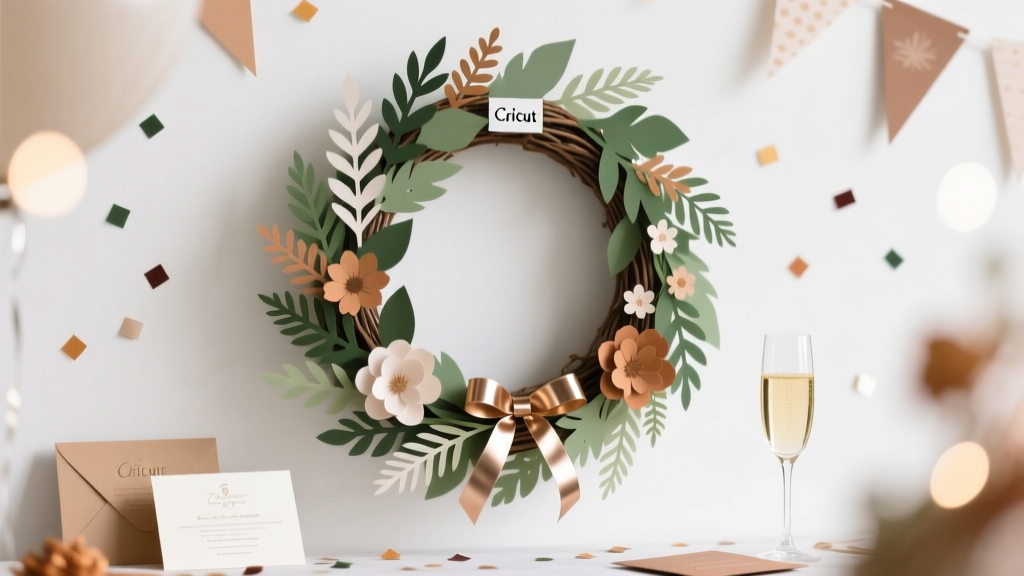
DIY Wreaths Using Cricut
There’s something instantly welcoming about a wreath—like a little “party starts here” sign for your front door, dessert table, gift station, or photo backdrop. The best part? When you make your own DIY wreaths using Cricut, you’re not limited to what’s in stores. You can match your exact party theme, colors, and wording—down to the last tiny detail.
This project is fun because it blends quick wins (cutting clean shapes with your Cricut) with hands-on creativity (layering, fluffing, arranging, and adding dimension). It’s also incredibly useful: you can reuse the wreath base and swap out seasonal or party-specific pieces, so one wreath can handle birthdays, baby showers, graduation parties, holidays, and everything in between.
Whether you’re a beginner who wants a simple “Happy Birthday” door wreath or an experienced crafter ready for layered cardstock florals and 3D accents, this guide walks you through practical, step-by-step instructions to create a handmade party decoration that looks custom and polished.
Project Overview: Skill Level, Time, and Finished Size
- Skill level: Beginner to Intermediate (advanced variations included below)
- Total time estimate: 60–120 minutes (plus glue drying time)
- Cricut cutting time: 10–30 minutes depending on complexity
- Typical wreath size: 12–14 in round (great for doors and party backdrops)
- Best use: Party decorations, front door welcome, dessert table decor, photo booth prop
Materials + Estimated Costs (Budget-Friendly Options Included)
Wreath Base Options
- Metal wire wreath frame (12 in): $2–$6
- Grapevine wreath (12–14 in): $6–$15 (adds rustic texture)
- Foam wreath form (12 in): $4–$10 (great for beginners)
Cricut Supplies
- Cricut machine: Cricut Explore Air 2 / Explore 3 / Maker / Maker 3 (use what you have)
- StandardGrip mat (green): $10–$15 (or a well-loved mat that still grips)
- Fine-Point Blade: standard for cardstock and vinyl
- Weeding tool + scraper: $8–$15 set (or use tweezers for weeding)
Decor Materials (Choose Your Look)
- Cardstock (65–80 lb, assorted colors): $6–$15 per pack
- Glitter cardstock (optional for sparkle accents): $6–$12
- Permanent vinyl (for names/phrases): $3–$10 per roll
- Iron-on (HTV) optional: only if applying to fabric ribbon/banner pieces
- Ribbon (1.5–2.5 in wide): $3–$8 per roll
- Faux greenery stems or florals: $5–$20 depending on style
- Mini party accents: confetti picks, mini balloons, tassels, paper fans (optional): $3–$12
Adhesives + Tools
- Hot glue gun + glue sticks: $10–$25 (high-temp holds best)
- Craft glue (quick-dry): $4–$8 (nice for cardstock layering)
- Floral wire (22–24 gauge) or pipe cleaners: $3–$7
- Wire cutters: $6–$12
- Scissors + ruler/tape measure: basic household tools
- Optional: brayer (helps cardstock adhere to mat), foam dots for dimension ($3–$6)
Estimated total cost per wreath: $12–$35 depending on what you already own and how elaborate you go.
Design Ideas for Party-Themed Cricut Wreaths
Pick one of these party-friendly concepts, then customize colors and wording in Cricut Design Space:
- Birthday wreath: “Happy Birthday,” name + age, stars, candles, confetti cutouts
- Baby shower wreath: “Oh Baby,” “Welcome Baby,” onesies, bottles, clouds
- Bridal shower wreath: “Bride to Be,” florals, rings, champagne glasses
- Graduation wreath: “Congrats Grad,” cap + diploma, school colors
- Holiday party wreath: “Merry & Bright,” snowflakes, ornaments
Step-by-Step: How to Make a DIY Wreath Using Cricut
Step 1: Choose a Finished Size and Layout
- Measure your base: A common size is a 12 in wreath frame, which typically looks best with a 6–8 in sign area and accents around 1–4 in each.
- Decide where your focal point goes:
- Bottom center = classic “welcome” look
- Top center = good for hanging signs or bows
- Diagonal arrangement = modern and dynamic for party themes
Step 2: Create Your Cricut Design (Beginner-Friendly)
- Open Cricut Design Space and start a new project.
- Add text: Choose a readable font for party messages (script fonts are pretty, but can be harder to weed).
- Set text size:
- Main phrase: 4–6 in wide
- Name/age add-on: 2–4 in wide
- Add shapes: stars, hearts, balloons, confetti dots, florals, or leaves.
- Keep it cut-friendly: For beginners, avoid extremely thin lines. If using script, use a “bold” script or thicken it with an offset.
Step 3: Cut Your Elements
- Place cardstock on a StandardGrip mat. Smooth with a brayer if you have one.
- Select material setting: “Cardstock” for standard paper, “Glitter Cardstock” for glitter.
- Cut and unload. Flip the mat over and peel the mat away from the cardstock to prevent curling.
Step 4: Make a Simple Cricut Wreath Sign (Clean + Reusable)
This is a strong option if you want a professional look and the ability to swap messages.
- Cut a sign base: Use 65–80 lb cardstock or thin chipboard. A great size is 6.5 in round or 5 x 7 in rectangle with rounded corners.
- Add vinyl text: Cut permanent vinyl for “Happy Birthday,” “Welcome,” etc.
- Weed the vinyl and apply with transfer tape.
- Optional seal (recommended for doors): Lightly brush with a clear sealer (spray sealer works well). Let dry fully.
Step 5: Prep the Wreath Base
Choose one base style below:
- Wire frame: Wrap ribbon around sections or add greenery stems with floral wire.
- Grapevine: Tuck greenery into the vines and secure with hot glue or wire.
- Foam form: Wrap ribbon or fabric around the foam and glue at the back.
Quick measurement tip: For a full ribbon wrap on a 12 in foam wreath, plan for about 8–12 yards of 2 in ribbon depending on overlap.
Step 6: Assemble the Focal Area
- Place your sign without gluing and step back 3–4 feet to check balance.
- Add a bow (optional but impactful): Use 2.5 in ribbon. A simple bow with 2 loops per side looks full without being bulky.
- Attach the sign:
- Wire frame: use pipe cleaners or floral wire through the frame
- Grapevine: wire or hot glue into the vine grooves
- Foam: hot glue + a couple of toothpicks pressed into foam for extra hold
Step 7: Add Cricut Cutouts for Party Personality
- Layer cardstock shapes with foam dots for dimension (confetti, stars, florals).
- Use clusters: Group 3–5 small shapes rather than spreading single pieces everywhere—clusters look more intentional.
- Secure with the right adhesive:
- Cardstock to cardstock: craft glue or hot glue (use small dots)
- Cardstock to greenery: hot glue
- Vinyl details: transfer tape + firm burnish
Step 8: Add Hanging Hardware
- Ribbon loop: Cut 18–24 in of ribbon, tie ends to the frame or grapevine.
- Command hook friendly option: Keep the hanger flat so it sits nicely on a wall or door.
Pro Tips for Clean Cuts and Professional-Looking Results
- Use an Offset for text: An offset of 0.08–0.12 in makes script text sturdier and easier to weed.
- Don’t skip test cuts: Especially with glitter cardstock and intricate shapes.
- Hide glue strings: Let hot glue cool slightly before pressing pieces together, and pull strings away with tweezers once cooled.
- Use foam dots strategically: Lift only the top layer of a flower or the edge of a banner for subtle depth.
- Pick a “rule of three” color palette: 1 main color, 1 supporting color, 1 metallic/neutral (great for party decorations).
Variations: Beginner-Friendly and Advanced Cricut Wreath Upgrades
Beginner-Friendly Adaptations
- Single-message vinyl sign: Cut one phrase and attach to a pre-made bow wreath
- Minimal greenery + big text: Fewer pieces, high impact
- Use pre-cut florals: Add Cricut text only for personalization
Advanced Variations
- Layered cardstock flowers: Make 3D roses or daisies (plan an extra 30–60 minutes)
- Shaker element sign: Create a “confetti window” with acetate and foam tape
- Interchangeable signs: Attach sign with Velcro dots so you can swap messages for different parties
- Wood round centerpiece: Use Cricut to cut vinyl for a stained wood round (more durable for outdoors)
Troubleshooting: Fixes for Common Cricut Wreath Problems
- My cardstock is tearing on intricate cuts.
- Switch to a lighter pressure or use “Cardstock for Intricate Cuts.”
- Try a new blade or slow the cut speed if your machine allows.
- Use higher-quality cardstock (80 lb tends to cut cleaner for detailed shapes).
- Vinyl isn’t sticking to my sign.
- Wipe the surface lightly (dust and glitter particles reduce adhesion).
- Burnish firmly and peel transfer tape slowly at a sharp angle.
- Use permanent vinyl for wreath signs that may face humidity.
- My wreath looks uneven or “empty.”
- Add one larger anchor element (big bow, large flower cluster, or banner strip).
- Build in layers: greenery first, then sign, then small accents.
- Use clusters instead of spacing pieces evenly all around.
- Things keep falling off the wreath.
- Use wire or pipe cleaners for heavier items instead of glue alone.
- For grapevine bases, tuck stems deep and secure with hot glue at contact points.
- Let hot glue fully set before hanging.
Common Crafting Mistakes to Avoid
- Using super thin fonts for door wreath text: It weeds poorly and can tear—choose bolder fonts or add an offset.
- Overloading the wreath with too many small shapes: It can look busy. Stick to a focal point and 1–2 supporting clusters.
- Skipping a dry-fit layout: Always place elements first before gluing so you can adjust spacing.
- Not considering hanging angle: A wreath may tilt forward—attach the hanger first, then place the sign so it hangs straight.
- Relying on glue alone for heavy decor: Wire heavier pieces for a sturdy, party-proof wreath.
FAQ: DIY Wreaths Using Cricut
What Cricut machine is best for making wreaths?
Any Cricut that cuts cardstock and vinyl works well (Explore Air 2, Explore 3, Maker, Maker 3). If you want to cut thicker materials like chipboard or basswood for a super durable sign, the Maker series gives you more tool options.
What size should my wreath sign be?
For a 12–14 in wreath, a sign around 6–8 in wide looks balanced. If your wreath is fuller (lots of greenery or a large bow), lean closer to 6–7 in so it doesn’t crowd the design.
Can I use Cricut vinyl on cardstock?
Yes. Permanent vinyl works best for crisp lettering on cardstock signs. If the cardstock is glittery or highly textured, use smoother cardstock or seal it first for better adhesion.
How do I make my wreath last outdoors?
Use a grapevine or metal frame base, permanent vinyl, and faux florals/greenery rated for outdoor use. Apply a clear spray sealer to cardstock signs and keep the wreath in a covered area to protect it from direct rain and intense sun.
What’s the easiest party wreath for a beginner?
A simple wire-frame wreath with a big bow and one Cricut-cut phrase (“Happy Birthday” or “Welcome”) is the quickest. Choose chunky fonts, limit the design to 2–3 colors, and add one accent cluster (stars or florals).
How can I make an interchangeable wreath for multiple parties?
Attach your main sign with heavy-duty Velcro dots or small zip ties that can be snipped and replaced. Keep a neutral base (white/black/greenery), then swap out Cricut-cut signs and themed accent picks for each celebration.
Make One Wreath—Use It for Every Celebration
DIY wreaths using Cricut are the kind of handmade project that feels extra special at party time—because it’s personalized, photo-ready, and made to match your theme. Start simple with a clean sign and a bold bow, then level up with layered cardstock flowers, vinyl personalization, and interchangeable pieces that keep your decor fresh all year.
If you make a party wreath, try jotting down your final measurements and colors so you can recreate the look for the next birthday, shower, or holiday gathering. Your future self will thank you when you need party decorations fast.
Want more DIY crafts, party decorations, and handmade project ideas? Explore more creative tutorials and smart celebration prep on smartpartyprep.com.
More Articles
 Step-by-Step Thank You Cards Tutorial
 What Is a Third Party Adapter? The Hidden Risks (and Real Savings) You’re Ignoring When Charging Your Laptop, Camera, or EV — Here’s How to Spot the Safe Ones in Under 60 Seconds
 Rustic Invitations Ideas (That You Can DIY at Home)
 How to Unblock 3rd Party Session Cookies in 2024: The Only 5-Step Guide You’ll Need (No Extensions, No Coding, Works on Chrome, Safari & Edge)
 Budget DIY Gift Boxes Under $20
 DIY Cake Toppers Party Favors
 How to Enable Third Party Cookies in 2024: A Step-by-Step Browser Guide (Chrome, Safari, Firefox, Edge) — Because Yes, Some Sites Still Need Them (and Here’s Exactly How to Do It Safely)
 DIY Candles for Anniversaries
 Advanced Scrapbook Pages for Crafters
 How Do You Make a Party Hat Out of Paper in Under 10 Minutes? (No Glue Gun, No Scissors Required — Just 3 Sheets & 1 Stapler)