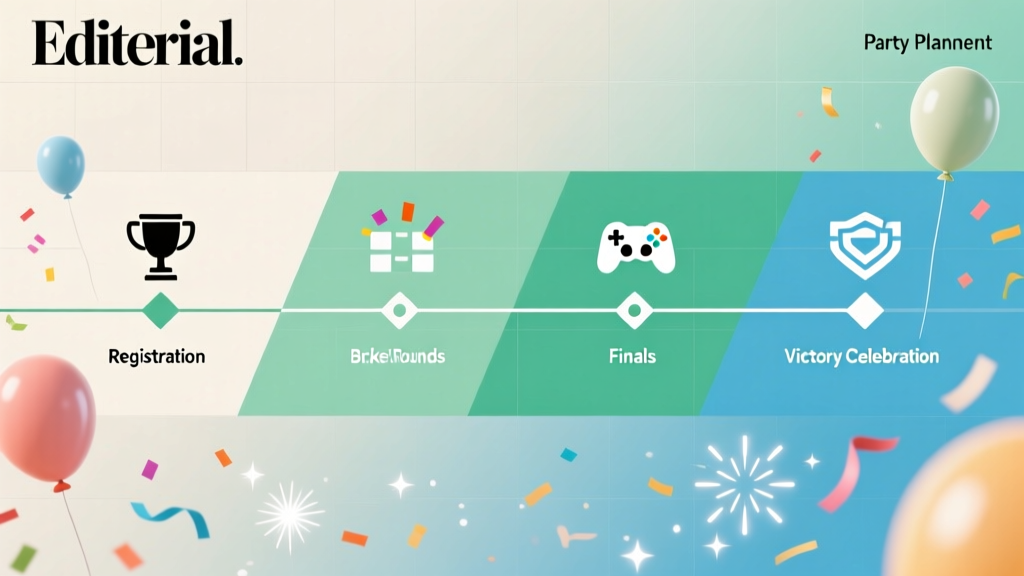
A Game Tournament Timeline Template
Game tournaments look effortless when they’re run well: players check in smoothly, matches start on time, rules are clear, and the atmosphere stays upbeat even when competition gets intense. Behind that “easy” experience is a planning timeline that accounts for logistics, people, equipment, and contingencies. Whether you’re coordinating a backyard cornhole bracket, a community esports night, or a multi-game party tournament, the right timeline turns a hectic event into a polished one.
A tournament is different from a typical party because time and fairness matter. You’re managing a structured flow (registration, bracket creation, match rotations, scoring) while still delivering a fun guest experience (music, food, seating, signage, and photo-worthy moments). With a practical template, you can make confident decisions early, protect your budget, and reduce the day-of “fire drills” that derail schedules.
This guide gives you a step-by-step tournament planning timeline template, checklists, budget considerations, vendor selection tips, common mistakes to avoid, and real-world examples you can adapt quickly—so your event feels organized, exciting, and memorable.
What This Game Tournament Timeline Template Covers
This template works for most tournament-style events, including:
- Party tournaments: board games, trivia, Mario Kart, Smash, poker night, party Olympics
- Casual sports tournaments: cornhole, pickleball, dodgeball, mini golf, basketball shootout
- Esports and gaming lounge events: console/PC tournaments with streamed finals
- Fundraisers and school/community events: ticketed tournaments with sponsors and prizes
Key event planning elements included:
- Format selection (single elimination, double elimination, round robin, Swiss-style)
- Registration, waiver, and check-in flow
- Venue layout and equipment planning
- Vendor coordination (A/V, catering, rentals, photography, security)
- Budget breakdown and cost-saving tips
- Day-of run of show and staffing plan
Pick the Right Tournament Format (Before You Build the Timeline)
Your schedule depends on your format. Choose based on number of players, time available, and the vibe you want.
Common Formats
- Single elimination: Fast, simple, fewer matches. Best for limited time. Downside: players are “done” quickly after a loss unless you add consolation games.
- Double elimination: Fairer, keeps players engaged longer. Requires more time and more scorekeeping.
- Round robin: Everyone plays multiple matches. Great for social tournaments. Needs a strong schedule and enough stations/courts.
- Swiss-style: Players continue each round against similarly ranked opponents. Efficient for large groups. Requires software or experienced scoring help.
Quick Planning Rule of Thumb
- If your event is 2–3 hours: single elimination or small round robin pools.
- If your event is 3–5 hours: double elimination or pools + finals.
- If your event is 5+ hours: round robin, Swiss-style, or multi-division brackets.
The Game Tournament Planning Timeline Template
Use this as your event planning and coordination roadmap. Adjust the timeframes depending on your event size (8 players vs. 80 players) and whether you’re hosting at home or at a rented venue.
6–8 Weeks Before: Foundation and Feasibility
Goal: Lock the concept, format, and major logistics so everything else is easier.
- Define the event purpose: birthday party, fundraiser, corporate team building, community night.
- Choose the game(s) and ruleset: confirm versions, equipment requirements, and house rules.
- Select tournament format: single/double elimination, round robin, pools + finals.
- Set the date and time window: include buffer time (setup and overrun).
- Estimate attendance: players vs. spectators.
- Choose venue type: home, community center, bar/restaurant, school gym, gaming lounge.
- Confirm venue constraints: noise rules, Wi-Fi strength, power access, parking, load-in.
- Create the event budget: include prizes, rentals, food, staffing, and contingency.
- Decide how you’ll collect registrations: online form, ticketing platform, RSVP list.
- Draft your event planning checklist: assign owners and deadlines.
Trend tip: Many events now use a simple digital hub (Google Drive folder or Notion board) to store rules, schedules, vendor contacts, and day-of scripts. It keeps coordination clean when multiple helpers are involved.
4–6 Weeks Before: Vendors, Equipment, and Promotion
Goal: Secure the “hard-to-change” items: space, gear, and support.
- Book vendors and rentals:
- A/V (speakers, mics, projector/screen)
- Tables, chairs, tents, barricades (if needed)
- Consoles/PCs/monitors or sports equipment
- Photobooth or photographer (optional)
- Confirm internet plan (for esports): test upload/download; plan for backup hotspot.
- Plan staffing: tournament director, check-in lead, scorekeeper(s), floor runners.
- Create basic branding: tournament name, simple logo, color theme for signage.
- Open registration and publish rules: include start time, check-in window, eligibility, sportsmanship.
- Prize plan: trophies, medals, gift cards, sponsor items, “best sportsmanship.”
- Food and beverage direction: catered, potluck, concessions, or venue-provided.
Vendor selection tip: Ask rental vendors about delivery windows and pickup timing. For event coordination, the best quote isn’t always the cheapest—reliable delivery and clear communication reduce day-of stress.
2–3 Weeks Before: Build the Experience and the Schedule
Goal: Turn the concept into a timed flow guests can actually follow.
- Create the match schedule framework:
- Estimate match length (include warmup + transition)
- Decide on best-of format (Bo1 vs. Bo3)
- Set station count (how many matches run at once)
- Draft a “Run of Show”: check-in, opening remarks, rounds, breaks, finals, awards.
- Finalize venue layout:
- Check-in table at entrance
- Clear station numbering (Station 1, 2, 3…)
- Spectator seating that doesn’t block play
- Dedicated tech/support table (esports)
- Food area away from equipment
- Prepare signage: rules summary, station numbers, schedule board, QR code for bracket link.
- Confirm accessibility and safety: cords taped down, clear walkways, hydration station.
- Communications plan: group text, WhatsApp, or Discord channel for real-time updates.
Real-world example: A 16-player Mario Kart tournament with 2 stations often runs smoother as 4 pools of 4 (round robin within pools) followed by a final bracket. Players get multiple races, and the schedule is more predictable than pure double elimination.
7–10 Days Before: Confirmations and Contingency Planning
Goal: Reduce uncertainty and build backup plans.
- Close or cap registration: finalize player count and waitlist.
- Collect waivers if needed: especially for physical sports or minors.
- Confirm vendor arrival times: delivery, setup, teardown responsibilities.
- Inventory equipment: controllers, cables, batteries, extension cords, clipboards.
- Create backup kits:
- Extra power strips and gaffer tape
- Spare controllers/mice
- First-aid kit and disinfecting wipes
- Printed brackets and score sheets
- Plan for no-shows and late arrivals: grace period policy, alternates, auto-forfeit timing.
- Finalize prizes and award script: keep it short, celebratory, and photo-friendly.
48–72 Hours Before: Final Prep
Goal: Make the day-of setup fast and error-proof.
- Send final player email/text: arrival time, parking, rules link, what to bring.
- Print essentials: check-in list, station labels, score sheets, schedule.
- Pre-build bracket templates: leave slots for last-minute changes.
- Confirm food order and delivery window: include dietary options if promised.
- Charge devices: tablets, microphones, camera gear, portable chargers.
Event Day: Tournament Run of Show (Sample Template)
Adjust times based on your event. This sample assumes a 4-hour tournament block.
- T-120 minutes: Venue access, vendor load-in, station setup, sound check
- T-90 minutes: Signage up, check-in table ready, test equipment and Wi-Fi
- T-60 minutes: Staff briefing (rules, timing, conflict resolution, escalation plan)
- T-45 minutes: Player check-in opens, music on, warmup stations open
- T-15 minutes: Registration closes, finalize bracket, announce rules
- T-0: Round 1 begins
- T+90 minutes: Mid-event break (10–15 minutes), post standings
- T+180 minutes: Semi-finals / finals prep, tighten schedule as needed
- T+210 minutes: Finals (feature match), photos/video
- T+230 minutes: Awards + sponsor thanks
- T+240 minutes: Open play / casual matches while teardown begins
Coordination tip: Use a visible “timing board” for staff (not guests) listing round start times, match length, and buffer minutes. This keeps your tournament director and runners aligned.
Post-Event: Wrap-Up (Within 24–72 Hours)
- Vendor returns and final payments: confirm pickup, check invoices.
- Send thank-you messages: players, volunteers, sponsors.
- Share photos and winners: tag sponsors and venue (if applicable).
- Collect feedback: short survey (3–5 questions) on flow, fairness, and fun.
- Document lessons learned: what ran late, what broke, what guests loved.
Game Tournament Planning Checklist (Quick Copy)
- Choose game(s), rules, and format
- Set date/time and confirm venue
- Build budget + 10% contingency
- Open registration and publish rules
- Book rentals/vendors (A/V, tables/chairs, equipment)
- Staff assignments: director, check-in, scorekeepers, runners
- Create run of show + schedule framework
- Design layout, signage, and station numbering
- Plan food/beverage and breaks
- Finalize prizes and award plan
- Test equipment and internet (if needed)
- Day-of: check-in, start rounds on time, track scores, post updates
- Post-event: payments, thank-yous, recap, feedback
Budget Considerations (With Sample Breakdown)
Building a realistic event budget is a core event planning skill. Use this sample breakdown for a 30–50 person tournament with 16–32 players; scale up or down.
Sample Budget Categories (Percentage Guide)
- Venue: 20–35%
- Equipment rentals / A/V: 15–25%
- Food & beverage: 20–30%
- Prizes & awards: 5–10%
- Staffing / security / EMT (as needed): 5–15%
- Decor, signage, printing: 3–8%
- Marketing / ticketing fees: 2–8%
- Contingency: 10%
Cost-Control Tips That Don’t Reduce Quality
- Limit custom printing: use one large rules poster + QR codes for details.
- Choose fewer, better prizes: one strong champion prize plus fun category awards.
- Borrow or sponsor equipment: local gaming groups or sports clubs often help for recognition.
- Use “pools + finals”: reduces total match count while keeping players engaged.
- Plan simple catering: boxed meals or a taco bar keeps service fast during round transitions.
Vendor Selection Tips for Smooth Coordination
- Ask about setup responsibility: Will the vendor set up tables/chairs or just drop off?
- Confirm power needs: A/V and gaming setups often require more circuits than expected.
- Request a single point of contact: day-of issues get solved faster.
- Check lead times: popular venues and rental companies book early, especially in spring and fall.
- Get documentation in writing: delivery window, overtime fees, damages, and cancellation terms.
Trend watch: More event organizers are adding a “content corner” (small backdrop + good lighting) for winner photos and short interviews. It’s a low-cost way to elevate the experience and support social sharing.
Common Game Tournament Planning Mistakes to Avoid
- Underestimating match time: Always include warmup, disputes, and station resets. Add 10–20% buffer.
- No clear rules authority: Assign a tournament director with final decision power.
- Too many formats at once: Keep it simple—especially for first-time tournament planning.
- Poor check-in flow: Bottlenecks at the start create schedule delays all day.
- Not planning for early eliminations: Provide side games, casual stations, or a consolation bracket.
- Weak signage and communication: If players don’t know where to go, you lose time every round.
- Skipping tech rehearsal (esports): Test devices, accounts, updates, and internet before doors open.
Real-World Timeline Examples
Example 1: 12-Team Cornhole Tournament (Community Fundraiser)
- Format: Pools of 4 teams (round robin) + top teams advance to single-elimination finals
- Stations: 3 boards/courts running at once
- Timing strategy: 20-minute match blocks with 5-minute transitions
- Guest experience: sponsor table, raffle tickets, simple concessions, music
- Budget focus: prizes + signage + tent/chair rentals; keep food simple to maximize fundraising
Example 2: 24-Player Fighting Game Tournament (Local Venue Night)
- Format: Double elimination
- Stations: 4 setups (monitor + console + two controllers)
- Timing strategy: publish check-in cutoff and strict round calls; one scorekeeper updates bracket live
- Trend add-on: streamed finals with a basic mic setup and simple overlay
- Risk plan: spare controllers, power strips, and a pre-downloaded game update plan
FAQ: Game Tournament Planning and Coordination
How far in advance should I plan a game tournament?
For a small home tournament (8–16 players), 2–3 weeks is workable. For a public or ticketed event with vendors, aim for 6–8 weeks so you can secure a venue, rentals, and staff without rushing.
What’s the best tournament format for keeping everyone engaged?
Round robin pools or pools + finals usually keep players happiest because everyone gets multiple matches. If time is tight, single elimination with a short consolation bracket is a good compromise.
How do I prevent the tournament from running late?
Use fixed match blocks, start on time, and build buffer into the schedule. Assign a tournament director to keep rounds moving, and post real-time updates via a bracket link or message channel.
Do I need software for brackets and scoring?
Not always. For small groups, a printed bracket and a dedicated scorekeeper can work well. For larger events, bracket/scoring tools reduce errors and help with communication—especially if you want live standings.
What should I include at the check-in table?
- Player list and markers
- Wristbands or name tags (optional but helpful)
- Printed rules summary
- Station map
- Waivers (if needed)
- Small supplies: pens, tape, spare phone charger
How do I plan food for a tournament without disrupting matches?
Choose foods that are quick to serve and easy to eat between rounds. Schedule a short break mid-event, keep drinks accessible throughout, and locate food away from gaming/electronic equipment.
Next Steps: Use This Template to Build Your Own Tournament Plan
Start by locking your format and your time window, then work backward using the timeline sections above. As you build your event planning checklist, focus on three success drivers: clear rules, a realistic schedule with buffers, and a clean communication system for players and staff. Once those are in place, the fun details—decor, music, prizes, and photo moments—become easy to add without disrupting the flow.
If you want more practical resources for party organization, event coordination, run-of-show planning, and guest experience design, explore additional guides on smartpartyprep.com.
More Articles
 Is Washington a two party consent state? Yes—and here’s exactly what that means for your next recording, call, or event (plus 5 steps to stay compliant and avoid lawsuits)
 How Much Does a Party Bus Cost to Rent? The Real-World Breakdown (Spoiler: It’s Not Just $299/hr—Here’s What Actually Drives Your Final Price)
What Do Guys Wear to Cocktail Party? The 7-Second Dress Code Decoder (No More Last-Minute Panic, Overpriced Rentals, or Awkward Outfit Regrets)
Is MN a one party consent state? The truth about recording conversations in Minnesota—and what you *must* know before hitting 'record' at your next event or meeting
What Does the Bible Say About Parties? 7 Biblical Principles That Transform Your Next Gathering from Casual to Culturally Confident—and Why Most Christians Get This Wrong
Who Did the Populist Party Represent? The Shocking Truth Behind America’s Forgotten Farmers’ Movement — And Why Modern Voters Are Repeating Its Mistakes
What Is Third Party Sale? The Hidden Risk Every Event Planner & Venue Owner Overlooks (And How to Protect Your Revenue, Reputation, and Contracts)
When Is the *Best* Time to Host a Bachelorette Party? (Spoiler: It’s Not 6 Weeks Before the Wedding — Here’s the Data-Backed Sweet Spot That Prevents Burnout, Saves Money, and Maximizes Fun)
Do You Bring Gifts to Bachelorette Party? The Real Etiquette Rules (No More Awkward Guesswork or Last-Minute Panic)
What Do You Wear to a Retirement Party? The 7-Second Dress Code Decoder (No Guesswork, No Awkward Outfits, Just Confidence)
How Much Does a Party Bus Cost to Rent? The Real-World Breakdown (Spoiler: It’s Not Just $299/hr—Here’s What Actually Drives Your Final Price)
What Do Guys Wear to Cocktail Party? The 7-Second Dress Code Decoder (No More Last-Minute Panic, Overpriced Rentals, or Awkward Outfit Regrets)
Is MN a one party consent state? The truth about recording conversations in Minnesota—and what you *must* know before hitting 'record' at your next event or meeting
What Does the Bible Say About Parties? 7 Biblical Principles That Transform Your Next Gathering from Casual to Culturally Confident—and Why Most Christians Get This Wrong
Who Did the Populist Party Represent? The Shocking Truth Behind America’s Forgotten Farmers’ Movement — And Why Modern Voters Are Repeating Its Mistakes
What Is Third Party Sale? The Hidden Risk Every Event Planner & Venue Owner Overlooks (And How to Protect Your Revenue, Reputation, and Contracts)
When Is the *Best* Time to Host a Bachelorette Party? (Spoiler: It’s Not 6 Weeks Before the Wedding — Here’s the Data-Backed Sweet Spot That Prevents Burnout, Saves Money, and Maximizes Fun)
Do You Bring Gifts to Bachelorette Party? The Real Etiquette Rules (No More Awkward Guesswork or Last-Minute Panic)
What Do You Wear to a Retirement Party? The 7-Second Dress Code Decoder (No Guesswork, No Awkward Outfits, Just Confidence)