Film Screening Seating Arrangement Ideas (and How to Plan Them Like a Pro)
A film screening can feel effortless to guests—grab a seat, watch the movie, enjoy the vibe. Behind the scenes, though, seating arrangement decisions can make or break comfort, sightlines, and the overall flow of your event. Whether you’re hosting a backyard movie night, a community fundraiser, a corporate premiere, or a classroom screening, the right layout helps guests settle in quickly and stay engaged from trailers to credits.
Thoughtful seating planning also supports safety, accessibility, and your event goals. Want guests to mingle before the film? Need clear aisle access for late arrivals? Trying to maximize ticket sales without making the room feel cramped? A smart seating plan is one of the most effective event coordination tools you have—and it doesn’t require a big budget, just a structured approach.
This guide walks through film screening seating arrangement ideas, step-by-step planning strategies, budget considerations, vendor selection tips, and common mistakes to avoid—so you can create a smooth, guest-friendly experience.
Start With the Basics: Space, Screen, and Sightlines
Measure and map your screening area
Before you pick a layout style, confirm your usable space. Create a simple floor plan (graph paper works, or use a free layout tool) and include:
- Total room/yard dimensions
- Screen location and size (or projector throw direction)
- Entry/exit doors, walkways, restrooms, concession area, and any obstructions
- Power access for projector, speakers, and any lighting
- Accessibility needs: ramps, wheelchair spaces, and clear aisle widths
Use these practical spacing guidelines
- Aisle width: Aim for 36–48 inches minimum for standard aisles; wider is better for high-traffic events.
- Row spacing: 30–36 inches between rows for chairs; more if guests will carry snacks or if the event is longer.
- Screen viewing distance: As a rule of thumb, keep the first row far enough back that guests aren’t craning their necks; test with a quick projection rehearsal.
- Accessible seating: Plan wheelchair spaces integrated throughout, not isolated at the back, with companion seating adjacent.
Real-world example: small community hall
A 30' x 50' hall with a 12' screen at the front typically performs best with a center aisle and two seating blocks (instead of one wide block). Guests find seats faster, late arrivals can slip in more discreetly, and concession traffic doesn’t cut through the middle.
Seating Arrangement Ideas for Different Screening Styles
1) Classic theater rows (best for ticketed screenings)
This is the go-to layout for focused viewing and maximum capacity. Align chairs in straight rows facing the screen, add aisles, and keep the center sightline clear.
- Ideal for: Fundraisers, premieres, corporate screenings, lectures + film
- Pro tips:
- Create a center aisle plus one side aisle for easier access.
- Use reserved front rows for VIPs, sponsors, or speakers.
- Stagger chairs slightly (a subtle “offset” pattern) to improve sightlines.
2) Chevron or angled rows (best for wide rooms)
Angle the seating blocks slightly toward the center of the screen. This reduces neck strain for side seats and often feels more “premium” than straight rows.
- Ideal for: Wide banquet rooms, multipurpose venues, gyms
- Pro tips:
- Mark chair alignment with painter’s tape so setup teams can match angles quickly.
- Keep aisles consistent to maintain fire-code compliance.
3) Cabaret-style (conversation-friendly, still screen-focused)
Place small round tables (or clusters) with chairs that face the screen—typically leaving a “gap” behind the table so no one is forced to watch with their back turned. This supports pre-show networking and snack placement.
- Ideal for: Corporate events, donor screenings, film clubs
- Pro tips:
- Use half-round tables or small cocktail tables to keep sightlines open.
- Assign table numbers for easier seating coordination.
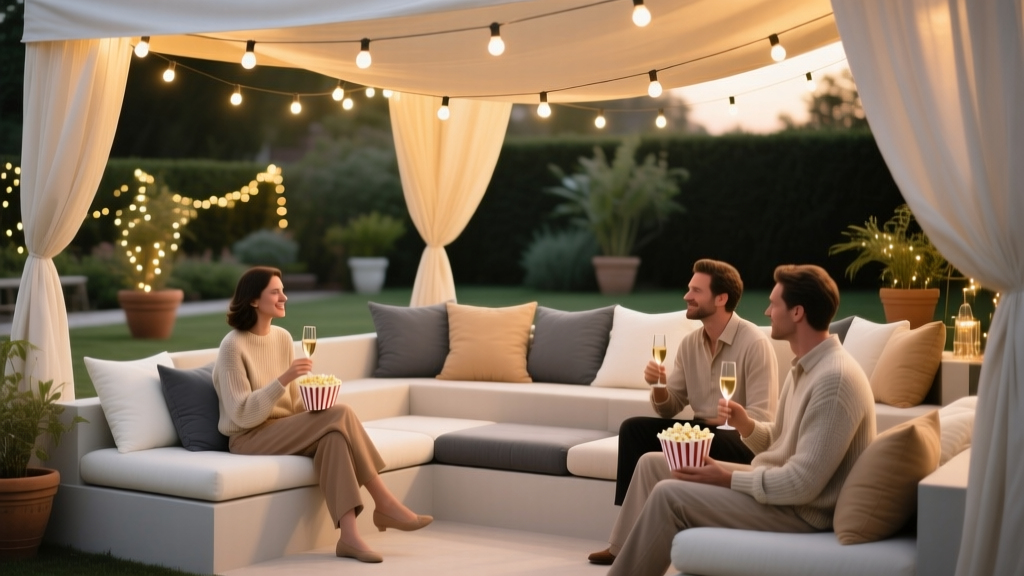
4) Lounge seating zones (trend-forward and highly photogenic)
One of the biggest event planning trends is building “zones” rather than uniform rows. Think sofas, ottomans, floor cushions, and low tables in grouped pods.
- Ideal for: Brand activations, modern indoor venues, backyard screenings
- Pro tips:
- Set expectations in invitations: “Bring a blanket” or “Floor seating available.”
- Keep at least one traditional chair section for guests who prefer upright seating.
- Use rugs to visually define seating pods and prevent “chair creep.”
5) Picnic blanket grid (outdoor movie night favorite)
Create a grid of blanket “plots” using small ground markers, cones, or discreet flags. Each plot fits a group and keeps walkways clear.
- Ideal for: Parks, school fields, community outdoor events
- Pro tips:
- Offer a limited number of lawn chairs behind blanket plots for those who want elevation.
- Reserve the back row for taller chairs to avoid blocking views.
- Build 2–3 wide aisles so guests can reach restrooms without stepping over blankets.
6) Mixed-height seating (a simple fix for blocked views)
Combine standard chairs up front with taller director chairs or bar-height seating toward the rear—or vice versa depending on your audience. The key is managing sightlines intentionally.
- Ideal for: Outdoor screenings, venues without raked floors
- Pro tips:
- Place tall seating only in designated rows to avoid random obstructions.
- Label rows on signage: “Low chairs,” “Standard chairs,” “High chairs.”
How to Assign Seats: Open Seating vs. Reserved Seating
Open seating (fast setup, relaxed vibe)
- Best for: Informal events, small private screenings, backyard parties
- Coordination tips:
- Open doors earlier to reduce last-minute crowding.
- Use clear signage so guests know where to sit and where aisles must remain open.
Reserved seating (better guest experience at larger events)
- Best for: Ticketed events, sponsor/VIP needs, capacity-sensitive venues
- Coordination tips:
- Use row/seat labeling with simple codes (A1, A2, B1…).
- Assign an usher lead to handle swaps, late arrivals, and accessibility requests.
- Consider a small “buffer” row to accommodate last-minute VIPs or accessibility adjustments.
Step-by-Step Planning Timeline (With Checklist)
4–6 weeks before: define the event and lock logistics
- Confirm venue and screening permissions/licenses (as applicable)
- Estimate attendance and decide on open vs. reserved seating
- Choose a seating style (theater rows, lounge zones, blanket grid, etc.)
- Draft a floor plan with aisles, exits, concessions, and accessible seating
- Request quotes from rental vendors (chairs, tables, lounge furniture, pipe and drape)
- Plan guest flow: check-in location, late-arrival route, restroom access
2–3 weeks before: refine layout and vendor orders
- Finalize seat count and add 5–10% extra chairs (or a contingency plan)
- Order rentals and confirm delivery/pickup windows
- Plan signage: “Row A,” “Reserved,” “Accessible seating,” “Keep aisle clear”
- Build your seating chart (if reserved) and confirm VIP placements
- Coordinate with AV: screen position, projector line-of-sight, speaker placement
7–10 days before: test and rehearse the experience
- Do a site walk (or backyard mock setup) and test projection angles
- Confirm lighting plan: pathway lights, aisle markers, and dimming strategy
- Confirm staffing: ushers, check-in, concessions, floor manager
- Print seating lists, reserved signs, and a simple “day-of” floor plan
Day before / day of: execute setup with a clear sequence
- Tape/mark aisles and chair rows first
- Place screen and AV equipment; confirm safe cable runs (use cable ramps or tape)
- Set chairs/tables/zones according to the plan
- Install signage at entry, aisles, and reserved sections
- Do a full seated sightline check from corners and back rows
- Brief ushers and staff: seating rules, late-arrival plan, accessibility support
Quick seating arrangement checklist (copy/paste)
- Floor plan printed and shared with team
- Aisles marked and kept unobstructed
- Accessible seating integrated + companion seats reserved
- VIP/sponsor/reserved sections clearly labeled
- Extra chairs available (or a defined overflow plan)
- Sightlines tested from multiple angles
- Pathway lighting set for safe movement
- Ushers briefed on late seating and quiet entry route
Budget Considerations (Sample Breakdown)
Your seating budget depends on capacity, comfort level, and whether you’re renting specialty items. Here’s a practical way to plan:
Typical cost categories
- Chair rentals: folding chairs, padded chairs, or specialty seating
- Tables and lounge pieces: cocktail tables, sofas, ottomans
- Delivery and labor: drop-off/pickup, setup/strike crew
- Lighting: pathway lights, battery uplights, string lights (outdoors)
- Signage and printing: seat labels, reserved signs, row markers
- Comfort add-ons: blankets, cushions, heaters/fans (weather dependent)
Sample budget breakdown for a 100-guest screening
- Seating (100 padded folding chairs): 30–45%
- Labor/delivery: 15–25%
- Lighting + safety (aisle/path lights, cable covers): 10–15%
- Signage/printing: 3–7%
- Contingency: 10% (weather shifts, extra chairs, last-minute changes)
Cost-control tip: If your budget is tight, prioritize comfortable chairs for longer films and use lower-cost options (like simple row markers) instead of elaborate decor. Guest comfort and clear organization are what people remember.
Vendor Selection Tips (Rentals, AV, and Staffing)
Rental vendor questions to ask
- What chair styles are available, and are quantities consistent in color/condition?
- Do you offer delivery windows that match venue access times?
- What are labor fees for setup/strike, and is it required by the venue?
- Do you provide layout help or a CAD/floor plan service?
- What is the damage/cleaning policy (especially for outdoor events)?
AV coordination that affects seating
- Confirm speaker placement so sound is balanced across sections
- Avoid seating directly in front of speakers at ear level
- Keep projector beam paths clear—no tall centerpieces or standing zones in the way
Staffing trend: dedicated “guest flow” roles
For larger screenings, many event planners now assign a staff member specifically to manage flow: directing guests to open sections, preventing aisle blockages, and guiding late arrivals. This reduces crowding and improves the guest experience without adding significant cost.
Common Film Screening Seating Mistakes to Avoid
- Overpacking the room: Maximum capacity isn’t always maximum comfort. Give guests aisle space and legroom.
- Ignoring sightlines from the sides: Always test views from corners and behind tall guests.
- No plan for late arrivals: Create a side route and have ushers seat people discreetly.
- Blocking exits or creating dead ends: Keep pathways open and follow venue/fire code rules.
- Underestimating comfort for long films: Padded seating, ventilation, and temperature control matter.
- Forgetting accessibility: Integrate accessible seating into prime viewing areas and ensure clear routes.
- Not labeling reserved sections clearly: Confusion at the door quickly turns into delays and frustration.
Real-World Seating Setups You Can Copy
Backyard screening for 25 guests (mixed seating)
- Front: 3 blanket plots (families/groups)
- Middle: 10 low lawn chairs
- Back: 10 standard folding chairs (taller guests)
- Two side aisles for snacks/restroom access
Corporate screening for 80 guests (cabaret hybrid)
- 6 cocktail tables near the back for networking
- Rows of padded chairs in front (center aisle + side aisle)
- Reserved VIP row with name cards
- Signage for “Quiet entry” once the film begins
FAQ: Film Screening Seating Arrangement Planning
How many seats should I plan for if RSVPs are still coming in?
Use your best attendance estimate and plan a 5–10% buffer. If space is tight, keep a defined overflow plan (standing zone at the back, additional row that can be added, or a second screening time).
What’s the best seating layout for a wide room?
Chevron/angled rows or two seating blocks with a center aisle typically improve sightlines and reduce neck strain for side seats.
How do I handle reserved seating without making check-in slow?
Use simple row/seat labels, print a master list for check-in, and assign one usher to seat-finding. Keep a small flexible section for adjustments and accessibility needs.
What’s the easiest way to keep aisles clear at a casual screening?
Mark aisles with tape or floor markers and add signage at the entry: “Please keep walkways clear.” Arrange concessions so lines don’t spill into aisles.
How can I make seating feel more premium on a budget?
Add a few lounge elements in a “featured” section (two sofas or a cluster of soft chairs), use warm pathway lighting, and keep rows straight and evenly spaced. A clean, organized setup reads as upscale.
Next Steps: Build Your Seating Plan and Run a Smooth Screening
Choose a seating style that matches your venue, audience, and event goals, then map it with sightlines, aisles, and accessibility in mind. Confirm rentals and AV early, label clearly, and rehearse the experience with a quick on-site test. The result is a film screening that feels comfortable, intentional, and easy for guests to navigate.
For more event planning, party organization, and coordination tips—plus timelines, checklists, and setup ideas—explore the latest guides at smartpartyprep.com.
More Articles
 What Is the Symbol of the Republican Party? The Elephant, Its Origins, Misconceptions, and Why Using It Correctly Matters More Than Ever in 2024 Election Events
 What Was the Boston Tea Party? The Real Story Behind the Tea Dumping — Not a Riot, Not a Party, and Absolutely Not About Taxation Alone (Here’s What Textbooks Get Wrong)
 What to Give for Engagement Party: 7 Thoughtful, Budget-Savvy Gifts (That Won’t Get Regifted or Forgotten — Backed by Real Couple Surveys)